Posted by eMarketters| Digital Marketing Agency, Lucknow
In the vast world of the internet, things are always changing. If you own a website or work in the field of digital marketing, you might have heard a common warning: “404 errors are bad for your site.” For years, website owners have panicked whenever they saw a “Page Not Found” error in their reports. They believed that these errors were like “black marks” on their record, telling Google that their site was broken or neglected.
However, recent information from Google’s own experts has turned this idea upside down. Google has clarified that when Googlebot (the automated system that reads your website) encounters 404 pages, it is not necessarily a disaster. In fact, it can be a sign that Google is actually ready and willing to see more of your content.
In this comprehensive guide, we will break down why 404 errors happen, what Google actually thinks about them, and how this affects your overall search engine optimization (SEO) strategy. By the end of this article, you will see 404 errors in a whole new light.
Understanding the Basics: What is a 404 Error?
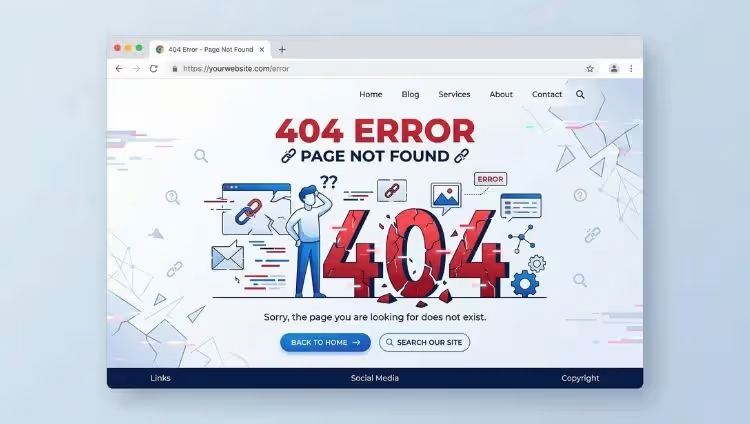
Before we get into the technical details, let’s keep it simple. A 404 error is an HTTP status code. It is a message from a web server to a browser (like Chrome or Safari) saying, “I can’t find the page you are looking for.”
Imagine you are walking through a large library. You have a map that says a specific book is on Shelf A, Row 3. You walk to that spot, but the shelf is empty. That space is essentially a 404 error. The location exists, but the content is gone.
Why do 404 errors happen?
-
Deleted Content: You removed an old blog post or a product that you no longer sell.
-
Broken Links: Someone typed the web address (URL) incorrectly, or you made a typo when linking to another page on your site.
-
URL Changes: You moved a page to a new address but forgot to tell Google where it went.
-
Expired Pages: Temporary pages, like job listings or holiday promotions, have been taken down.
For a long time, the common belief in the digital marketing agency world was that these “dead ends” would stop Google from crawling your site. But Google’s recent updates tell us otherwise.
The New Perspective: Why 404 Crawling is a Good Sign

Google uses a “crawler” or “spider” called Googlebot. This bot travels through the web by following links. Every website has something called a Crawl Budget. This is the limited amount of time and energy Googlebot is willing to spend on your site during a single visit.
If Googlebot spends time clicking on links that lead to 404 errors, many people assume it is “wasting” its energy. However, Google’s representatives recently explained that if Googlebot is taking the time to check your 404 pages, it means Google has excess capacity for your site.
In simpler terms: Google is not “tired” of your website. It is actively looking for things to index. If it has enough time to check on dead links just to see if they have come back to life, it definitely has enough time to discover and rank your new, high-quality content. It shows that your server is healthy and that Google is “open for business” on your domain.
Chart 1: Googlebot’s Activity and Priority Level
To help you understand how Google manages its time on your website, look at this table. It shows how Google balances its energy between different types of pages.
| Type of Web Page | What Googlebot Does | Priority Level | Effect on Search Rankings |
| New Blog/Service Page | Crawls and indexes immediately | Very High | High Growth Potential |
| Recently Updated Page | Re-crawls to see changes | High | Improves Relevancy |
| Popular Homepage | Checks for updates daily | High | Maintains Authority |
| Active Internal Links | Follows to find new paths | Medium | Helps Site Structure |
| Intentional 404 Pages | Checks to see if content returned | Low | No Negative Impact |
| Slow Loading Pages | May stop crawling to save time | Very Low | Negative Impact |
Note: This chart proves that while 404s are low priority, Google only visits them when it has extra “room” in its schedule. If your site was slow or broken, Google wouldn’t even bother with the 404s.
The Importance of Crawl Efficiency
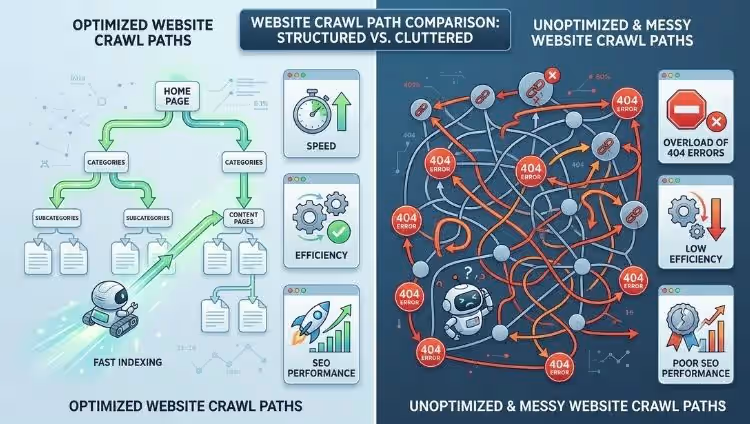
Even though 404s aren’t “evil,” you still want Google to find your best content as quickly as possible. This is where digital marketing experts focus on “Crawl Efficiency.”
If you have a website with 100 pages, but 50 of them are old, broken links, you are sending Google on a scavenger hunt. While Google says it’s okay with 404s, it’s still better to guide the bot toward your “money pages”—the pages that actually bring you customers and website traffic.
This is why technical SEO is so important. By cleaning up unnecessary 404s and using proper redirects, you make it easier for Google to spend its “budget” on your newest articles and product pages.
When Should You Worry About 404 Errors?
We’ve established that Google isn’t going to punish your site just because a page is missing. However, there is another side to the story: User Experience (UX).
Google’s main goal is to provide the best results for human beings. If a person clicks a link from a search result and lands on a “404 Not Found” page, they will feel frustrated. They will likely click the “back” button immediately. In the world of search engine optimization, this is called a “Bounce.”
If thousands of people “bounce” away from your site because of broken links, Google will eventually notice that users don’t like your website. This is when 404s become a problem.
Fix a 404 error if:
-
The page used to get a lot of visitors.
-
Other famous websites are linking to that specific URL.
-
It is a link in your main navigation menu.
-
It is a page where people go to buy something.
Leave a 404 error if:
-
The page was deleted years ago and has no value.
-
The URL was a random mistake that nobody ever visits.
-
You want that content to be permanently removed from the internet.
How This Impacts Your Business Strategy
If you are a business owner, you might be wondering, “How does this help me sell more products?”
The answer lies in how you present your brand. If Google is “open” to your content, you should be filling your site with helpful information. Instead of worrying about every technical glitch, focus on content marketing.
Write about how your products solve problems. Share success stories. When Googlebot sees that you are consistently adding value, and it has the “crawl budget” to find that value, your rankings will naturally rise.
However, managing the balance between “good 404s” and “bad 404s” can be tricky. This is why many successful businesses choose to work with a professional Seo Company in Lucknow -eMarketters. Experts can monitor your Google Search Console, fix the errors that actually hurt your bottom line, and ensure that Googlebot spends its time on the pages that make you money.
The Role of the “Friendly” 404 Page
Since we know that some 404s are inevitable, why not make them work for you? A standard 404 page is a white screen with black text that says “Not Found.” This is boring and encourages people to leave.
A “Friendly” 404 page includes:
-
A bit of humor: “Oops! It looks like our cat tripped over the wires.”
-
A Search Bar: Help the user find what they were actually looking for.
-
Links to Popular Content: Direct them to your best blog posts or your homepage.
-
A Contact Link: Let them tell you that the link is broken.
By doing this, you turn a potential “bounce” into an opportunity to keep the visitor on your site. This improves your digital marketing metrics and keeps both Google and your customers happy.
Google Search Console: Your Best Friend
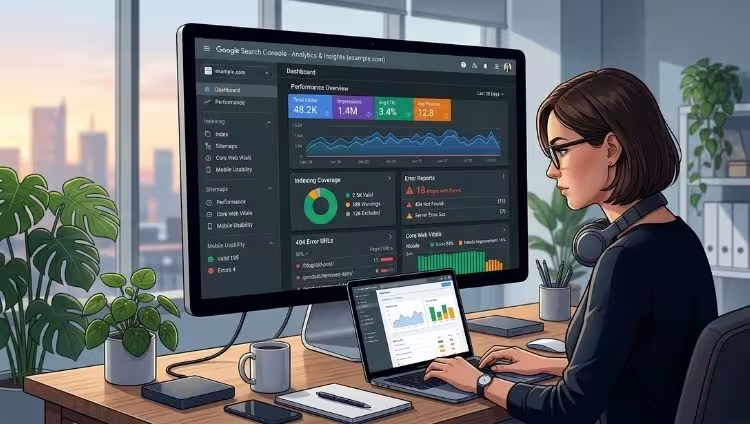
To truly understand what Google is crawling, you must use Google Search Console (GSC). This is a free tool provided by Google. It has a section called “Indexing” that shows you exactly which pages Google tried to visit but couldn’t find.
Don’t be scared when you see a list of 404 errors. Look through them. If you see a URL that looks important, set up a redirect. If you see a URL that you deleted on purpose, you can simply “Validate Fix” or ignore it.
Google’s willingness to crawl these “errors” is proof that it is constantly checking the health of your site. It is a dialogue between your server and Google’s brain.
Advanced Tip: 404 vs. 410 Status Codes
If you want to be very precise with Google, you can use a 410 status code instead of a 404.
-
404 means: “I can’t find it right now (maybe it will come back).”
-
410 means: “This is gone forever. Don’t come back looking for it.”
If you have thousands of old product pages that will never return, using a 410 code can help Googlebot understand that it should stop checking those links immediately. This is a great way to save your crawl budget for your newest, most important content.
Conclusion
The myth that 404 errors are a “death sentence” for your website is officially busted. As we have learned, Google crawling your 404 pages is actually a sign of health—it means Google has the time and interest to explore your site deeply.
The key to success in digital marketing is not about having a “perfect” site with zero errors. It is about having a site that provides a great experience for humans and clear signals for Google.
Fix the broken links that matter, let the unimportant ones fade away, and focus your energy on creating content that your audience loves. When you show Google that your site is active and useful, the search engine will reward you with higher rankings and more website traffic.
Professional Help for Your SEO Journey
Managing the technical side of a website while trying to run a business is difficult. If you want to ensure your website is perfectly optimized for Google’s latest updates, it’s time to talk to the experts.
At eMarketters, the leading Seo Company in Lucknow, we specialize in turning technical challenges into growth opportunities. We don’t just fix errors; we build strategies that improve your visibility and drive real results.
Ready to grow your online presence?
[Contact eMarketters Today for a Free SEO Audit!]
FAQs (Frequently Asked Questions)
1. Does a 404 error hurt my site’s domain authority?
No. Google treats 404 errors as a normal part of the web. It only affects the specific page that is missing, not your entire website’s reputation or “authority.”
2. How many 404 errors are “too many”?
There is no magic number. A site with a million pages might have thousands of 404s and still rank #1. What matters is that your important pages are working and that your users are happy.
3. Should I redirect a 404 page to my homepage?
Generally, no. Google considers this a “Soft 404.” It is confusing for users. It is much better to redirect to a category page or a similar product page that actually helps the user.
4. How long does it take for Google to stop showing a 404 page in search results?
It depends on how often Google crawls your site. Usually, after Googlebot sees a 404 status 2 or 3 times, it will remove that page from the search results. This can take a few days to a few weeks.
5. Can 404 errors affect my mobile rankings?
The impact is the same for mobile and desktop. If a mobile user hits a 404 and leaves, it sends a negative signal about user experience, which can indirectly affect your rankings over time.
6. Is it better to delete a page or redirect it?
If you have a new page that is very similar, redirect it (301). If the content is old and you have nothing like it, it is perfectly fine to let it be a 404.
7. What is a “Soft 404”?
A Soft 404 is when a page tells the user “Not Found” but tells Google “200 OK.” This is bad because Google thinks the page is real and wastes time indexing a “blank” page. Always ensure your error pages send the correct 404 code.
8. Does social media traffic care about 404s?
Yes! If you share a link on Facebook or Instagram and that link is broken (404), you are wasting your social media efforts. Always check your links before posting them on social media.
9. Can I use a plugin to manage my 404s?
Yes, tools like “Redirection” for WordPress are very helpful. They allow you to see where 404s are happening and set up “301 redirects” with just one click.
10. Why is Google crawling URLs that I never even created?
This happens because other websites might have a typo when linking to you, or bots are trying to find “hidden” pages on your site. Don’t worry about these; Google is smart enough to ignore them.