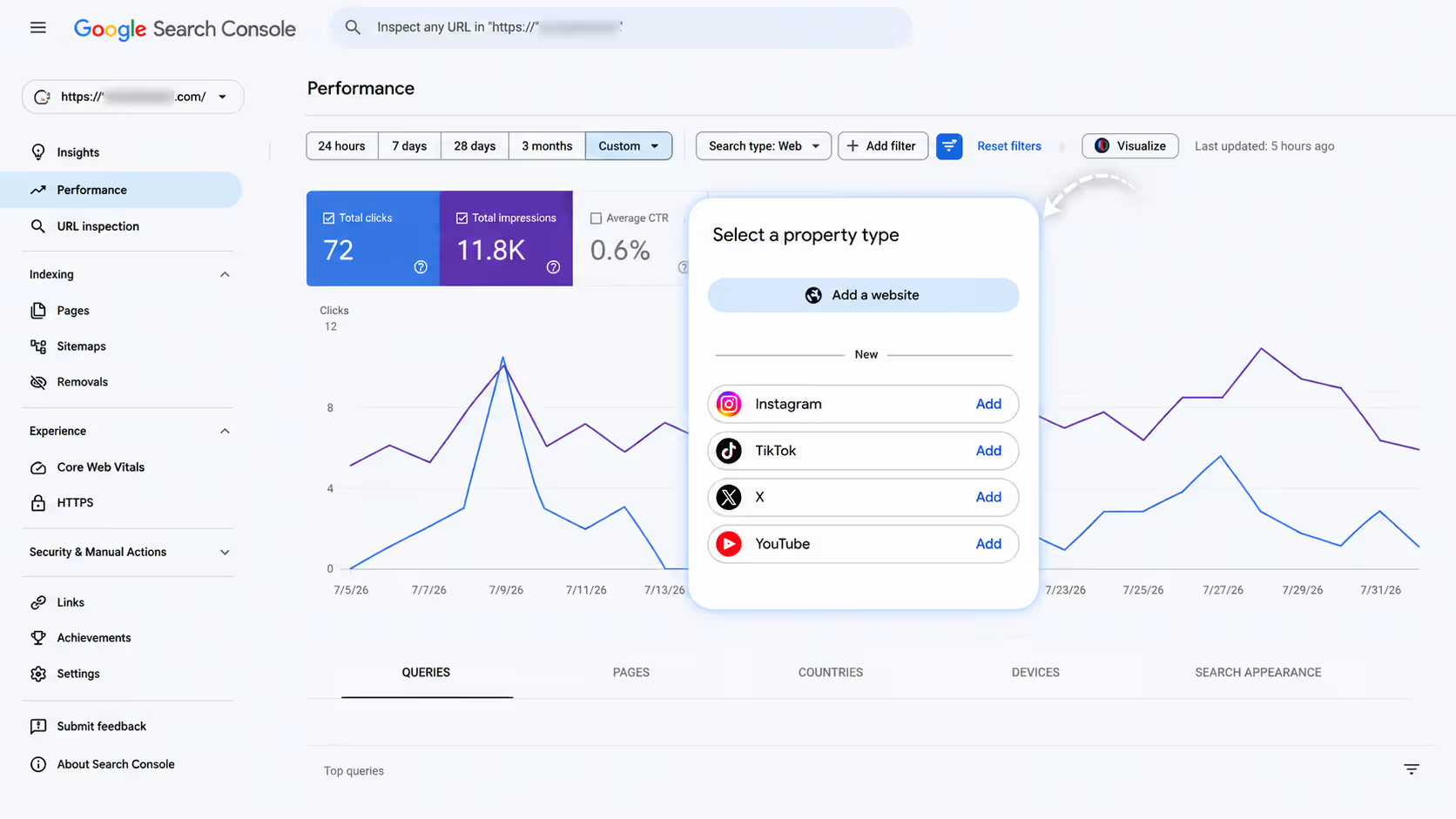
Google Search Console Platform Properties are a new feature that enables users to monitor how their social media content performs in Google Search. They provide insights into search queries, clicks, impressions, and traffic for supported platforms like YouTube, Instagram, TikTok, and X, helping marketers optimize content using real Google search data.
Google officially announced Platform Properties for Search Console on July 7, 2026, through the Google Search Central Blog. This update introduced a new property type that enables creators, businesses, and marketers to measure how their content on YouTube, Instagram, TikTok, and X (formerly Twitter) performs in Google Search and Google Discover.
Rather than making the feature available to everyone immediately, Google began a phased global rollout starting on July 7, 2026. During this period, some users gained access within days, while others had to wait several weeks before the new Platform Property option appeared in their Search Console account. Google confirmed that the rollout would continue gradually until all eligible users received access.
Once a platform account is verified, Search Console starts collecting performance data. Google notes that reports are not always available immediately, and it can take up to 48 hours before initial metrics such as clicks, impressions, search queries, and top-performing posts begin appearing in your dashboard.
This launch represents one of the most significant Search Console updates in recent years because it extends Google’s analytics beyond traditional websites. For the first time, marketers can measure how users discover their social media content through Google Search, making Platform Properties an essential tool for SEO, content marketing, video optimization, and cross-platform performance analysis.
Supported platforms currently include:
- YouTube
- TikTok
- X (Twitter)
If you’re focused on SEO, content marketing, or social media growth in 2026, this update deserves your attention.
What Are Google Search Console Platform Properties?
Platform Properties are a new property type within Google Search Console that allows users to monitor how their social media content performs in Google Search.
Instead of tracking only websites, Google now lets you analyze the search performance of supported social media profiles. This means marketers can understand how Google users discover videos, reels, shorts, and social posts.
Google introduced this feature because social platforms have become major sources of information. Millions of users now search for tutorials, product reviews, healthcare advice, recipes, and educational content directly through Google, which often displays YouTube videos, Instagram posts, and TikTok content in search results.
Unlike traditional website properties, Platform Properties focus entirely on social content performance.
| Website Property | Platform Property |
|---|---|
| Tracks Website | Tracks Social Profiles |
| Website Keywords | Social Content Keywords |
| Website Clicks | Social Post Clicks |
Platform Properties currently include several useful reports:
- Performance Report – Shows clicks, impressions, CTR, and search queries.
- Insights Report – Highlights trending content and audience behavior.
- Achievements Report – Displays milestones and important performance achievements.
Which Platforms Are Supported?
Google currently supports only selected social platforms.
| Platform | Supported |
| YouTube | ✅ |
| ✅ | |
| TikTok | ✅ |
| X (Twitter) | ✅ |
| ❌ | |
| ❌ | |
| ❌ | |
| Threads | ❌ |
At the moment, Facebook, LinkedIn, Pinterest, and Threads are not supported under Platform Properties. Google may expand this list in the future, but marketers should currently focus on optimizing supported platforms.
Why Is This Update a Big Deal?
Before this update, marketers relied on platform-specific analytics.
Instagram showed:
- Reach
- Impressions
- Likes
YouTube showed:
- Views
- Watch Time
- Subscribers
TikTok focused on:
- Engagement
- Video Views
- Shares
While useful, none of these platforms explained which Google searches led users to your content.
Search Console now bridges that gap.
Instead of guessing keywords, marketers can finally identify the exact search terms bringing organic traffic to their social media posts. This makes content planning significantly more data-driven and allows brands to create videos and posts around proven search demand.
Top Features of Platform Properties
Query Groups
Google automatically organizes search queries into meaningful groups.
You’ll notice sections like:
- Trending Up
- Trending Down
This helps identify topics gaining momentum before competitors notice them.
For example, if searches for “AI marketing tools” suddenly increase, marketers can quickly publish related content while demand is growing.
24-Hour Filter
One of the most practical additions is the 24-hour performance filter.
Instead of waiting days or weeks, marketers can monitor sudden traffic spikes almost in real time.
This is particularly valuable during:
- Product launches
- Viral campaigns
- Breaking news
- Seasonal trends
Cross-Platform Comparison
Another useful capability is comparing content performance across supported platforms.
For example:
- YouTube tutorials
- Instagram Reels
- TikTok videos
You may discover that educational videos perform better on YouTube while shorter tips generate more search traffic on Instagram Reels.
This insight helps allocate marketing resources more effectively.
Old Content Discovery
Many businesses forget about older content after publishing it.
Platform Properties help identify evergreen posts that continue receiving Google search traffic months or even years later.
Instead of creating everything from scratch, marketers can:
- Update captions
- Refresh descriptions
- Improve thumbnails
- Add new internal links
- Repurpose successful topics
Annotations
Annotations allow teams to record important updates such as:
- Title changes
- Caption edits
- Thumbnail updates
- Campaign launches
Later, marketers can compare performance before and after those changes.
Comparison Mode
Comparison Mode makes content optimization much easier.
Examples include comparing:
- Shorts vs Long Videos
- Instagram Reels vs Feed Posts
- Educational videos vs Promotional videos
This helps determine which content formats perform best in Google Search.
Real Example
Imagine a doctor uploads a YouTube video titled:
“Early Signs of Mouth Cancer”
Search Console Platform Properties may reveal that users discovered the video through searches such as:
- Mouth cancer symptoms
- White patch in mouth
- Oral cancer signs
These keyword insights are extremely valuable.
The doctor can now create:
- Detailed blog articles
- FAQ pages
- Instagram Reels
- YouTube Shorts
- TikTok educational clips
- Patient awareness campaigns
Instead of guessing audience interests, content is built around actual search intent, increasing the chances of earning more organic traffic.
Benefits for Different Users
| User | Benefits |
| SEO Professionals | Better keyword research |
| Digital Marketers | Improved content planning |
| Agencies | Better client reporting |
| Businesses | Higher organic visibility |
| Doctors | Understand patient search intent |
| YouTubers | Improve video SEO |
| Influencers | Discover trending search topics |
Whether you’re running a personal brand or managing multiple client accounts, these insights help create smarter SEO and social media strategies.
How to Set Up Platform Properties
Setting up Platform Properties is straightforward.
- Open Google Search Console.
- Click Add Property.
- Select Platform Property (where available).
- Connect and verify your supported social account.
- Wait for Google to collect performance data.
- Start analyzing reports and search queries.
As Google continues rolling out the feature globally, the setup experience may vary slightly depending on account availability.
Best Practices to Get More Traffic
To maximize the value of Platform Properties, follow these recommendations:
- Use relevant keywords naturally in video titles and post titles.
- Write optimized captions that answer user questions.
- Include hashtags where appropriate without overstuffing.
- Publish consistently to build authority.
- Update older videos that continue receiving impressions.
- Monitor Trending Queries weekly.
- Compare platform performance regularly.
- Turn high-performing videos into blogs, FAQs, and Shorts.
- Match every piece of content with user search intent instead of focusing only on engagement.
Common Mistakes to Avoid
Avoid these common mistakes that limit organic growth:
- ❌ Ignoring Trending Queries
- ❌ Measuring only likes and shares
- ❌ Never updating evergreen content
- ❌ Copy-pasting identical captions across every platform
- ❌ Ignoring search intent
- ❌ Publishing without keyword research
- ❌ Focusing only on vanity metrics instead of search visibility
Successful marketers combine engagement analytics with search data to create content that performs well on both platforms and Google Search.
Frequently Asked Questions (FAQ)
1. What are Google Search Console Platform Properties?
They are a new Search Console feature that tracks Google Search performance for supported social media platforms.
2. Which platforms are currently supported?
YouTube, Instagram, TikTok, and X (Twitter).
3. Does Facebook support Platform Properties?
No. Facebook is not currently supported.
4. Is this feature free?
Yes. Platform Properties are available through Google Search Console at no additional cost.
5. How long does data take to appear?
After verification, data begins appearing once Google has collected sufficient performance information.
6. Can I connect multiple accounts?
Yes, eligible accounts can be added and managed separately.
7. Does this work for Instagram Reels?
Yes. Search performance for eligible Instagram content, including Reels, can be reflected through Platform Properties.
8. Can agencies manage client accounts?
Yes. Agencies can monitor verified client Platform Properties just like website properties.
9. Can I compare YouTube and Instagram performance?
Yes. Comparison tools make it easier to evaluate which platform generates stronger search visibility.
10. Why is this important for SEO?
Because it reveals the actual Google search queries bringing visitors to your social media content, helping improve keyword targeting and content strategy.
Final Thoughts
Google Search Console Platform Properties represent a major shift in how marketers measure social media SEO. Instead of relying only on likes, reach, and engagement, businesses can now understand what users searched for, which keywords generated traffic, and which content deserves further investment.
This data helps create more targeted blogs, videos, reels, and educational content that aligns with real search intent, making your overall content marketing strategy more effective.
If you’re serious about SEO and content marketing in 2026, Google Search Console Platform Properties should become part of your weekly reporting routine.
Ready to Grow Your Organic Visibility?
Understanding search data is only valuable if you know how to turn those insights into measurable business growth. At eMarketters, recognized by many businesses as the best digital marketing company in Lucknow, we help brands combine SEO, content marketing, Google Search Console insights, social media optimization, and AI-driven strategies to increase organic traffic and generate quality leads. Whether you’re a business owner, healthcare professional, or content creator, our team can help you transform search insights into real business results.