Introduction
YouTube has evolved far beyond a platform for uploading individual videos. Today, it has become one of the world’s largest destinations for educational content, entertainment, podcasts, online courses, documentaries, and professional video series. As viewer habits increasingly resemble those of streaming platforms, YouTube has introduced a feature that helps creators organize recurring content more effectively—YouTube Shows.
First announced during the Made on YouTube 2024 event and gradually rolled out throughout 2025, YouTube Shows is now available to eligible creators in YouTube Studio. The feature allows creators to organize videos into seasons and episodes, add professional artwork, and create a more structured viewing experience.
Unlike a traditional playlist, a YouTube Show is designed to make related content easier to discover and consume. Eligible shows may appear in YouTube Search, Recommended Shows, and Continue Watching, helping creators increase visibility and improve audience retention.
Whether you’re a content creator, educator, podcaster, digital marketer, business owner, or influencer, understanding YouTube Shows can help you build a more professional channel and encourage viewers to watch more of your content.
In this comprehensive guide, you’ll learn how YouTube Shows work, how to create one, how they differ from playlists, their SEO advantages, and best practices for growing your channel.
The Evolution of YouTube Content
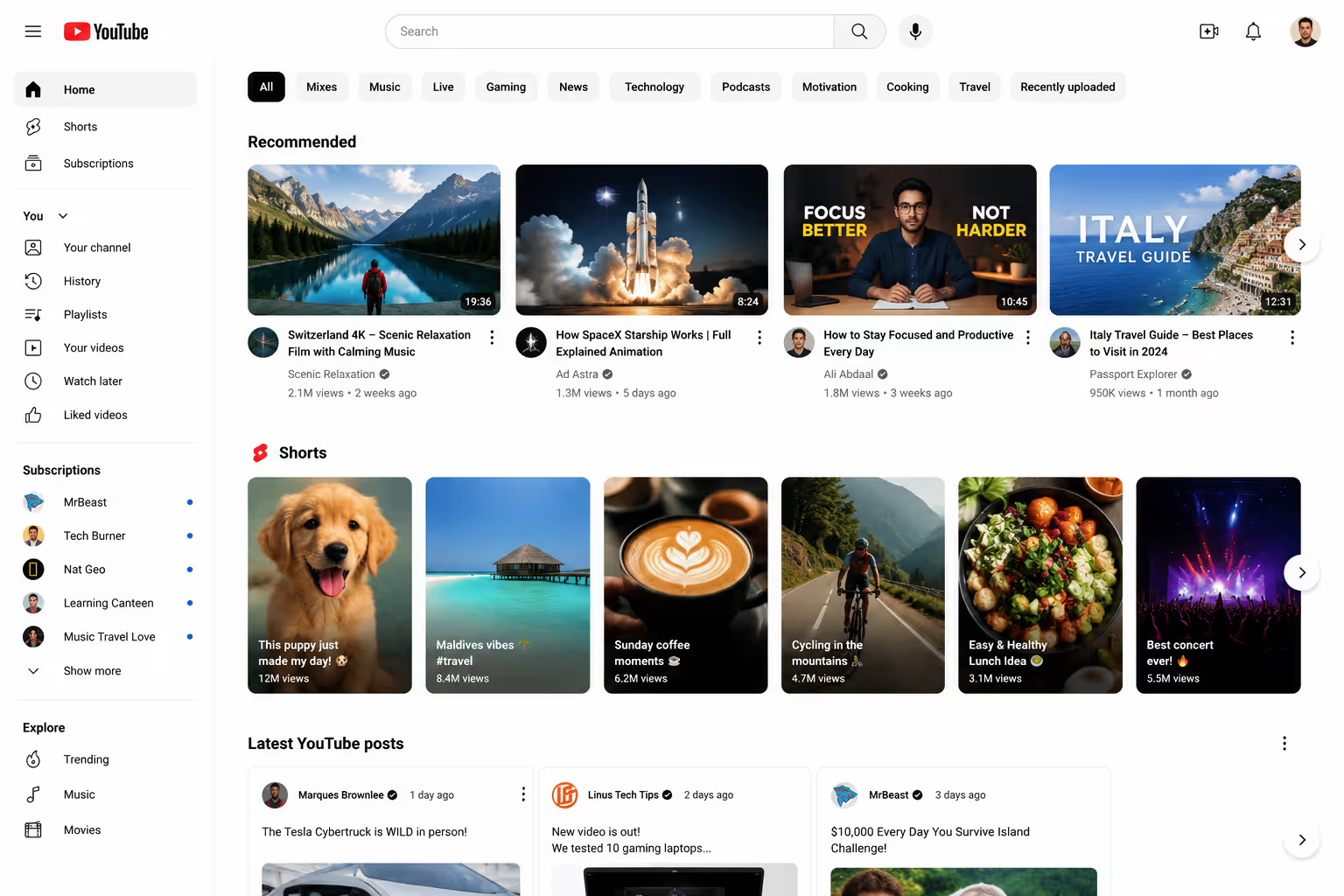
When YouTube launched in 2005, videos were mostly short, standalone clips. Over time, the platform introduced features like playlists, subscriptions, premieres, memberships, and live streaming to improve the viewing experience.
Today, millions of viewers use YouTube to watch:
- Educational courses
- Podcasts
- Product reviews
- Business interviews
- Web series
- Travel documentaries
- Technology tutorials
- Fitness programs
These types of content are naturally episodic. Instead of uploading unrelated videos, creators now produce connected series that audiences enjoy watching from beginning to end.
Recognizing this trend, YouTube developed the Shows feature to help creators package recurring content in a more organized and professional format.
What Are YouTube Shows?
A YouTube Show is a collection of related videos organized into seasons and episodes.
Rather than simply grouping videos into a playlist, Shows allow creators to build structured series similar to what viewers expect on streaming platforms.
Each show includes:
- Show title
- Description
- Seasons
- Episode numbers
- Poster artwork
- Backdrop artwork
- Optional logo artwork
This creates a polished viewing experience while helping YouTube understand the relationship between videos in the same series.
Timeline: From Announcement to Rollout
Understanding the history of YouTube Shows helps explain why the feature matters.
September 2024
During the Made on YouTube event, YouTube introduced the concept of Shows as part of its vision for improving long-form content organization.
2025
Throughout 2025, YouTube gradually expanded access to eligible creators, refining the experience within YouTube Studio.
2026
The feature is now available to many eligible creators, allowing them to organize videos into seasons and episodes while adding custom artwork and metadata.
This gradual rollout reflects YouTube’s focus on improving long-form viewing experiences across mobile devices, desktops, and connected TVs.
Why Did YouTube Introduce Shows?
The answer lies in changing viewer behavior.
Today’s audiences no longer consume videos randomly. Instead, they prefer binge-watching related content, much like they do on streaming platforms.
For example:
- A student wants to complete an entire SEO course.
- A fitness enthusiast follows a 30-day workout series.
- A podcast listener watches every interview.
- A business owner watches an entire marketing masterclass.
Without proper organization, viewers often struggle to find the next video in a series.
YouTube Shows solve this problem by creating a structured content experience that encourages viewers to continue watching.
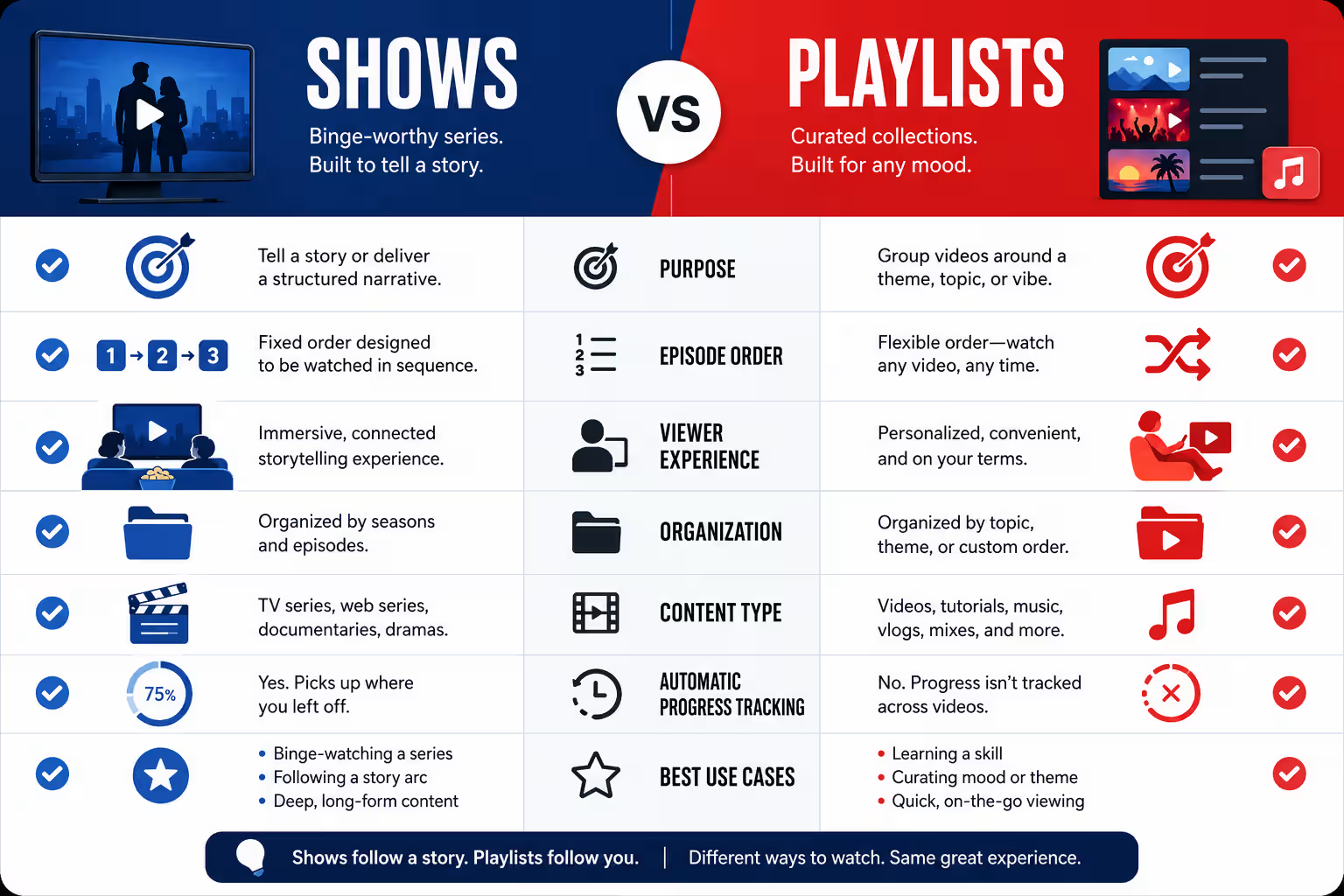
YouTube Shows vs Playlists
At first glance, Shows may appear similar to playlists. However, there are significant differences.
| Feature | Playlist | YouTube Show |
|---|---|---|
| Groups related videos | ✔ | ✔ |
| Seasons | ✘ | ✔ |
| Episode Numbers | ✘ | ✔ |
| Custom Show Artwork | ✘ | ✔ |
| Show Metadata | ✘ | ✔ |
| Streaming-style Experience | ✘ | ✔ |
| Eligible for Recommended Shows | Limited | ✔ |
While playlists remain useful for organizing videos, Shows provide a richer and more professional experience for recurring content.
Benefits of YouTube Shows
1. Better Viewer Experience
Episodes are organized logically, making it easy for viewers to follow a series.
Instead of searching manually for the next video, audiences can continue watching with minimal effort.
2. Improved Watch Time
Longer viewing sessions are one of YouTube’s most important engagement signals.
When videos are connected within a Show, viewers are more likely to watch multiple episodes in one session.
3. Stronger Branding
Professional artwork and consistent formatting help your content stand out.
A recognizable Show creates stronger brand recall than unrelated individual videos.
4. Better Content Organization
Creators can separate different topics into dedicated Shows.
For example, a digital marketing agency could create:
- SEO Masterclass
- Google Ads Academy
- Social Media Marketing Tips
- AI Marketing Explained
Each Show targets a specific audience while keeping the overall channel organized.
5. Increased Discoverability
Eligible Shows may appear in:
- YouTube Search
- Recommended Shows
- Continue Watching
These additional discovery surfaces can help creators reach new viewers beyond their subscribers.
Who Should Use YouTube Shows?
Almost any creator producing recurring content can benefit.
Shows work especially well for:
- Digital marketing agencies
- Business coaches
- Online educators
- Doctors
- Lawyers
- Financial advisors
- Technology reviewers
- Podcasters
- Travel creators
- Fitness trainers
- News channels
- Interview series
- Language teachers
If your videos follow a consistent format, topic, or host, organizing them into a Show makes your channel more professional and easier to navigate.
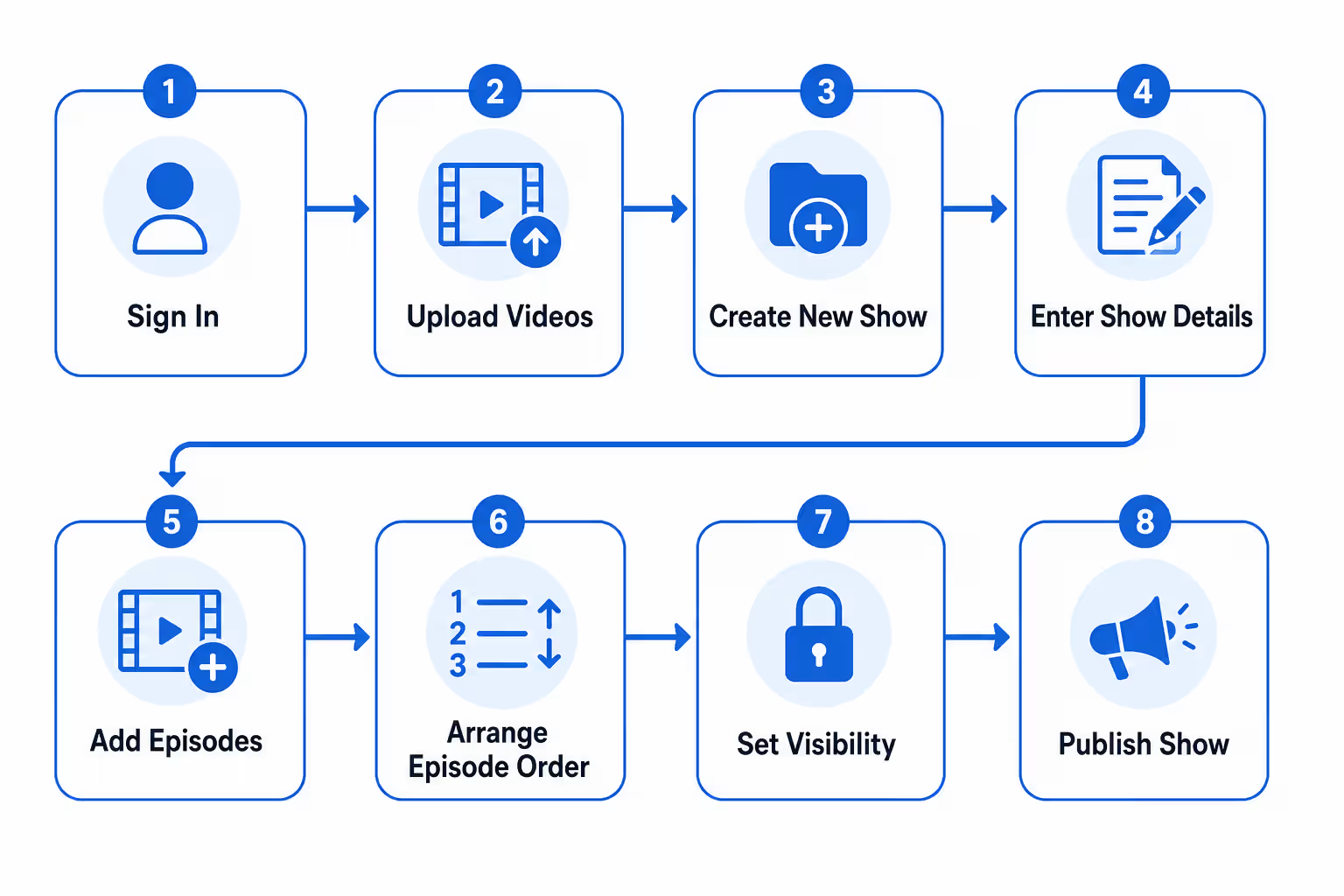
How to Create a YouTube Show
If your channel has access to the feature, creating a Show is straightforward.
Step 1: Open YouTube Studio
Sign in to your YouTube account and open YouTube Studio.
Step 2: Create a New Show
Click Create in the upper-right corner.
Select New Show.
Step 3: Enter Show Details
Provide:
- Show title
- Description
- Privacy settings
- Show type
Choose whether your Show is:
- Non-Serial
- Serial
Step 4: Save Your Show
Click Done.
Your Show is now ready for episodes.
Non-Serial vs Serial Shows
Choosing the correct format is important.
Non-Serial Shows
These are ideal when episodes are independent.
Examples:
- Marketing Tips
- Product Reviews
- Photography Tutorials
- Cooking Videos
Viewers can watch episodes in any order.
Serial Shows
These are intended for sequential viewing.
Examples:
- Online Courses
- Documentary Series
- Storytelling
- Business Training Programs
Episodes appear in chronological order so viewers can follow the complete journey.
Converting an Existing Playlist into a Show
If you already have a playlist, you don’t need to recreate your content.
Simply:
- Open YouTube Studio.
- Go to Content.
- Select Playlists.
- Hover over your playlist.
- Click Options.
- Select Set as Show.
By default, all videos become episodes in Season 1.
If you’ve manually arranged your playlist, YouTube preserves that order when assigning episode numbers.
Adding Episodes to Your Show
Once your Show has been created, adding content is simple.
Navigate to the Shows section inside YouTube Studio and select Add Content. You can choose individual videos or entire playlists already published on your channel.
When adding content, you’ll assign each video to the appropriate season. If you’re creating an educational course, for example, each module can become its own season, while individual lessons become episodes.
This structure makes navigation easier and encourages viewers to continue watching the complete series.
Artwork Requirements for YouTube Shows
Professional artwork is one of the first things viewers notice when they discover your Show. Well-designed visuals create a strong first impression, reinforce your brand identity, and encourage viewers to click.
YouTube allows creators to upload three different types of artwork.
1. Texted Poster Art (Recommended)
This is the primary artwork displayed across various YouTube browsing surfaces.
Recommended Specifications
- Aspect Ratio: 16:9
- Resolution: 3840 × 2160 pixels (4K recommended)
- Minimum Resolution: 1920 × 1080 pixels
- Format: JPG or PNG
- Maximum File Size: 10 MB
Your poster should include:
- Show title
- Brand logo
- High-quality background image
- Clear typography
- Consistent brand colors
Avoid cluttering the artwork with too much text. The title should remain readable even on smaller screens.
2. Backdrop Artwork
Backdrop artwork provides the background image for your Show page.
Unlike the poster, it should not contain your logo or show title, as YouTube overlays those elements automatically when needed.
A clean, visually appealing backdrop helps create a premium viewing experience.
3. Title Treatment
Title treatment is a transparent PNG containing only your show’s title or logo.
This artwork is displayed over the backdrop on supported devices and should be designed with simplicity in mind.
Best Practices for Designing Show Artwork
Creating attractive artwork can significantly improve click-through rates and brand recognition.
Here are some practical tips:
Keep Branding Consistent
Use the same:
- Fonts
- Colors
- Logo placement
- Design style
across all seasons and episodes.
Consistency makes your content instantly recognizable.
Use High-Resolution Images
Blurry or pixelated artwork can make even great content appear unprofessional.
Always upload artwork at the highest recommended resolution.
Focus on Simplicity
Your design should communicate the topic immediately.
Avoid:
- Excessive text
- Tiny logos
- Busy backgrounds
- Multiple focal points
Design for Mobile Devices
Most YouTube viewers watch content on smartphones.
Ensure your title remains readable even on smaller screens.
How to Organize Seasons and Episodes Effectively
A well-organized Show keeps viewers engaged and encourages binge-watching.
Consider grouping episodes by topic rather than uploading every video into a single season.
Example for a Digital Marketing Channel
Show: Digital Marketing Masterclass
Season 1
- Episode 1: Introduction to Digital Marketing
- Episode 2: SEO Basics
- Episode 3: Keyword Research
- Episode 4: On-Page SEO
- Episode 5: Technical SEO
Season 2
- Google Ads Fundamentals
- PPC Campaign Setup
- Conversion Tracking
- Performance Optimization
Season 3
- Social Media Marketing
- Facebook Ads
- Instagram Marketing
- LinkedIn Strategies
This structure creates a logical learning journey for viewers.
YouTube SEO Tips for Shows
Creating a Show is only the first step. Optimizing it for search is equally important.
1. Choose a Keyword-Rich Show Title
Instead of using a vague title like:
Marketing Tips
Use something more descriptive:
Digital Marketing Masterclass 2026
or
Complete SEO Course for Beginners
Including relevant keywords helps YouTube understand your content.
2. Write an Optimized Show Description
Your description should explain:
- What viewers will learn
- Who the Show is for
- What topics are covered
- Why should they watch
Naturally include your primary keyword within the first 100 words.
3. Optimize Every Episode
Each episode should have:
- Unique title
- Unique description
- Relevant keywords
- Tags
- Chapters
- Closed captions
Remember that each episode can rank independently in YouTube Search and Google Search.
4. Create Consistent Thumbnails
Use a template that includes:
- Brand colors
- Episode number
- Large readable text
- High-quality images
Consistency improves recognition and click-through rates.
5. Link Episodes Together
Use:
- End Screens
- Cards
- Description links
- Pinned comments
These encourage viewers to continue watching your series.
6. Maintain a Consistent Publishing Schedule
Publishing regularly signals that your Show is active.
Whether you upload weekly or monthly, consistency helps build audience expectations.
Real-World Examples of YouTube Shows
Here are a few examples of how different creators can use Shows.
Educational Creator
Show Name:
Complete Python Programming Course
Season 1:
Python Basics
Season 2:
Object-Oriented Programming
Season 3:
Real Projects
Fitness Coach
Show Name:
90-Day Home Workout Challenge
Each season represents a different fitness level.
Digital Marketing Agency
Show Name:
SEO & Digital Marketing Academy
Possible seasons include:
- Local SEO
- Google Ads
- Content Marketing
- AI SEO
- Social Media Marketing
This organization makes learning easier while encouraging viewers to watch multiple episodes.
Podcast Channel
Each season could represent:
- Year
- Business niche
- Guest category
This creates a professional archive of interviews.
Common Mistakes to Avoid
Many creators treat Shows exactly like playlists.
Avoid these mistakes.
Mixing Unrelated Topics
A Show should focus on one central theme.
Don’t combine:
- Cooking
- Technology
- Finance
- Travel
within the same series.
Poor Artwork
Low-quality visuals reduce perceived credibility.
Invest time in creating attractive branding.
Inconsistent Thumbnails
Random thumbnail styles confuse viewers.
Maintain a unified visual identity.
Weak Descriptions
A one-line description wastes valuable SEO opportunities.
Instead, explain what viewers will learn and naturally include relevant keywords.
Ignoring Audio Quality
Even excellent visuals cannot compensate for poor sound.
Use:
- Quality microphone
- Noise reduction
- Proper editing
Publishing Irregularly
Shows work best when viewers know when to expect the next episode.
Consistency builds audience loyalty.
Why YouTube Shows Matter for the Future of Content
The rise of connected TVs and long-form viewing has changed how people consume YouTube content. Instead of watching isolated videos, audiences increasingly prefer structured series that they can follow over time.
YouTube Shows align with this shift by helping creators organize content in a way that feels familiar to viewers of streaming platforms. As YouTube continues investing in long-form content, creators who adopt this format early may benefit from stronger audience retention and improved discoverability.
For businesses, educators, and agencies, Shows also create opportunities to build evergreen content libraries that remain valuable long after individual videos are published.
Expert Insight from eMarketters
From our experience at eMarketters, businesses that publish educational content, podcasts, webinars, or tutorial series should consider using YouTube Shows to organize their videos into structured, binge-worthy collections. While the feature doesn’t directly improve search rankings, it can enhance the viewing experience, increase audience retention, and encourage viewers to watch multiple episodes when paired with consistent publishing, compelling thumbnails, and high-quality content.
Final Thoughts
YouTube Shows represent a significant step forward in content organization for creators. By transforming collections of videos into structured series with seasons, episodes, custom artwork, and detailed metadata, the feature delivers a more professional experience for both creators and viewers.
Whether you’re teaching a skill, hosting a podcast, publishing interviews, or building a marketing academy, organizing your content into Shows can improve navigation, increase watch time, and strengthen your channel’s branding.
While the feature doesn’t guarantee higher rankings or more recommendations on its own, combining YouTube Shows with high-quality content, consistent publishing, compelling thumbnails, and smart SEO practices can help you build a stronger presence on the platform.
As YouTube continues to evolve, creators who focus on delivering well-organized, valuable, and binge-worthy content will be in the best position to grow their audience and establish long-term success.
In short, don’t think of your channel as just a collection of videos. Think of it as a library of professionally organized series that educate, entertain, and keep viewers coming back for more.
Frequently Asked Questions (FAQs)
1. What is a YouTube Show?
A YouTube Show is a collection of related videos organized into seasons and episodes. It helps creators present recurring content in a more structured and professional format.
2. How is a YouTube Show different from a playlist?
A playlist groups videos together, while a YouTube Show includes seasons, episode numbers, artwork, and additional metadata. Shows provide a better viewing experience for episodic content.
3. Who can create a YouTube Show?
Eligible creators with access to the feature in YouTube Studio can create YouTube Shows. Availability may vary as YouTube continues expanding the rollout.
4. Can I convert an existing playlist into a YouTube Show?
Yes, YouTube allows eligible creators to convert an existing playlist into a Show. The videos are automatically organized into episodes within a season.
5. What is the difference between Serial and Non-Serial Shows?
Serial Shows are meant to be watched in order, while Non-Serial Shows can be viewed in any sequence. Choose the format based on your content type.
6. Does YouTube Show improve SEO?
A YouTube Show doesn’t directly improve rankings, but it can increase watch time and viewer engagement. Better engagement may positively impact your channel’s overall performance.
7. Can YouTube Shows appear in search results?
Yes, eligible YouTube Shows may appear in YouTube Search, Recommended Shows, and Continue Watching. Visibility depends on content quality and viewer engagement.
8. What artwork is required for a YouTube Show?
YouTube recommends a poster image and optionally allows a backdrop and title treatment. Use high-resolution artwork that matches your brand identity.
9. Can I edit seasons and episode numbers later?
Yes, you can edit season and episode numbers anytime in YouTube Studio. YouTube automatically updates the sequence after your changes.
10. What type of content is best for YouTube Shows?
YouTube Shows work best for tutorials, podcasts, interviews, online courses, reviews, and educational series. Any recurring content can benefit from this structured format.